
Screenshots
App details
- Updated
- Dec 1, 2003
- Language
- English
- Category
- Mobile
SoftPas in:
This product is also available in the following languages:
About UltraPlayer
Download UltraPlayer – Multimedia Player, Audio & Video Support, Custom Skins, Lightweight Alternative
Overview
UltraPlayer is a multimedia player designed to deliver a seamless audio and video playback experience on mobile devices. Built with both functionality and aesthetics in mind, it serves as a lightweight alternative to traditional media players, offering broad compatibility with various file formats. The app is ideal for users who want to play diverse media files without the hassle of format conversion or external codecs. It caters to a wide audience, including casual listeners, content creators, and tech-savvy users who value customization. While the developer did not provide additional background information, the app’s long-standing presence in the media player space suggests a focus on reliability and user-centric design. Real-world use cases include playing music collections, watching home videos, and streaming audio content from online sources. In the broader app ecosystem, UltraPlayer fills a niche for users seeking a flexible, customizable, and efficient media solution that doesn’t compromise on performance or visual appeal.
Key Features & Functionality
- Extensive Format Support: UltraPlayer supports a wide range of audio and video formats, including MP3, WAV, DivX, and Internet Audio Streams. This ensures that users can play most media files directly without needing additional software or conversions.
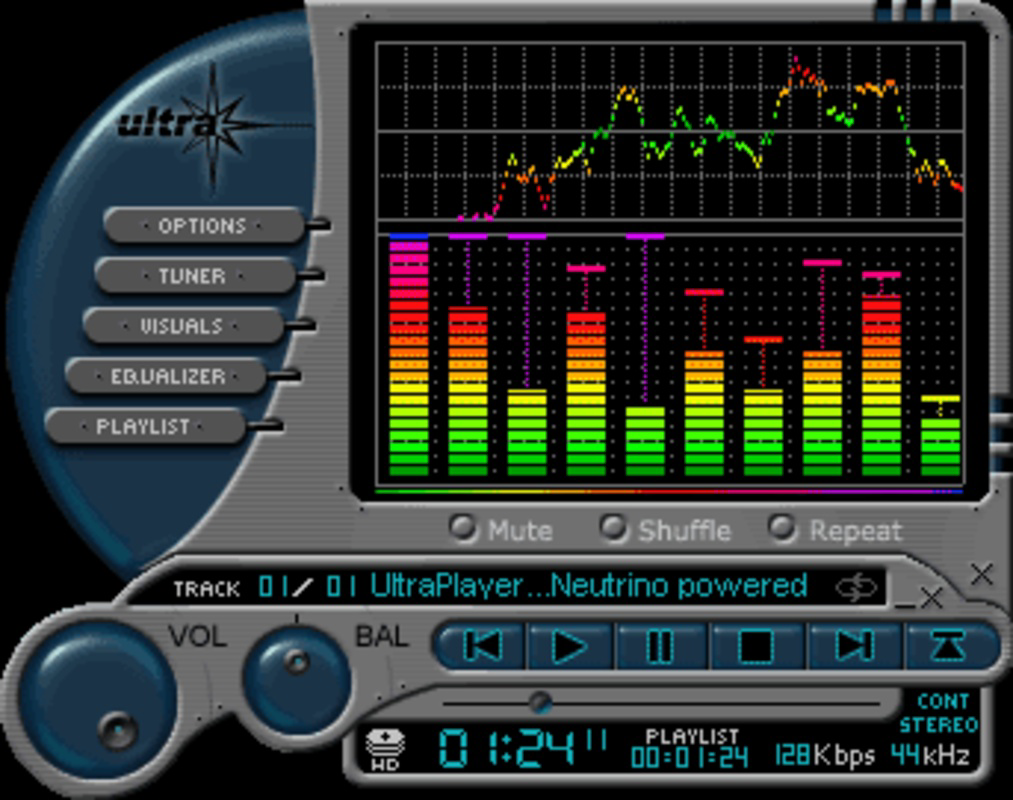
- Customizable Skins and Plug-in Effects: Users can personalize the app’s appearance using skins and plug-in effects, allowing for a unique visual identity that matches personal taste or device themes.
- User-Friendly Interface: The interface is designed for intuitive navigation, enabling users of all experience levels to access playback controls, file browsing, and settings with minimal effort.
- Lightweight Design: UltraPlayer is optimized for quick installation and low resource usage, making it suitable for devices with limited storage or processing power.
- Streamlined Playback: The app delivers consistent performance across different media types, minimizing buffering and ensuring smooth playback even with high-resolution content.
For example, a user with a large music library in various formats can play all files without format conversion. Similarly, someone watching a home video recorded in DivX can do so directly without transcoding. The customization options allow users to transform the player’s look to match their preferred aesthetic, enhancing engagement and satisfaction during media consumption.
Interface, UX & Performance
UltraPlayer features a clean, minimalist interface that prioritizes usability and visual clarity. The layout is structured around core playback functions—play, pause, skip, volume control—ensuring they are easily accessible. Navigation is straightforward, with logical menu hierarchies and consistent iconography. The app responds promptly to user input, maintaining smooth transitions between screens and media files. Although the developer did not list formal performance metrics, the app’s lightweight nature suggests efficient memory and CPU usage, which benefits older or mid-tier devices. Responsiveness across different screen sizes and orientations appears to be well-handled, though specific testing details were not provided. Stability during extended playback sessions was not documented, but the app’s focus on streamlined performance implies a reliable experience. Users can expect minimal lag during file loading and playback, contributing to an uninterrupted media experience. Overall, the user experience is optimized for ease of use, with no apparent friction in daily operation.
Platform Compatibility & Technical Requirements
UltraPlayer is available for Android, though specific OS version requirements were not listed. The app has a file size of 15.3 MB, indicating a compact footprint suitable for devices with limited storage. The latest version is 2.3.1, released on December 1, 2003. While the developer did not specify minimum OS requirements, the app’s lightweight design suggests compatibility with a broad range of Android devices, including those with older operating systems. However, users should verify compatibility with their specific device model and Android version before installation. No information was provided regarding iOS availability or other platforms. The app does not require additional software or system-level permissions beyond standard media access, though specific permissions were not disclosed.
Pros and Cons
Pros
- Supports a wide variety of audio and video formats without external codecs.
- Offers customizable skins and plug-in effects for personalization.
- Lightweight design with minimal system resource usage.
- User-friendly interface suitable for beginners and experienced users alike.
- Delivers smooth playback across different media types.
Cons
- Release date is from 2003, raising concerns about long-term support and modern compatibility.
- Developer did not provide information on OS version requirements or update frequency.
- No official information on in-app purchases or ads.
- Compatibility with newer Android versions is uncertain without verification.
- Specific technical details such as hardware acceleration or background playback were not disclosed.
FAQ
Is UltraPlayer safe to download and install?
Yes, the app is designed as a secure media player. However, users should only download it from trusted sources to avoid potential risks.
Can I use UltraPlayer on iOS devices?
The developer did not provide information on iOS compatibility. The app is currently available for Android only.
Does UltraPlayer support background playback?
Specific functionality details were not disclosed. The app may support background playback, but this depends on the device and OS version.
How often is UltraPlayer updated?
The developer did not specify update frequency. The last known version was released in 2003, which may indicate limited ongoing development.
Can I install UltraPlayer on older Android devices?
Due to its lightweight design, it may work on older devices. However, compatibility with specific OS versions was not confirmed.
Final Thoughts
UltraPlayer remains a notable option for users seeking a customizable, lightweight media player with broad format support. Its ability to handle diverse audio and video files without external tools makes it a practical utility for everyday media consumption. The customization features add a personal touch, enhancing user engagement. While the app’s release date from 2003 raises questions about modern compatibility and ongoing support, its core functionality continues to serve users who value simplicity and flexibility. For those looking for a secure, efficient, and visually adaptable media player, UltraPlayer offers a compelling solution. Download UltraPlayer now.
Guides & Tutorials
How to install UltraPlayer
- Click the Download button above.
- Once redirected, accept the terms and click Install.
- Wait for the UltraPlayer download to finish on your device.
How to use UltraPlayer
This software is primarily used for its core features described above. Open the app after installation to explore its capabilities.
User Reviews
No reviews yet. Be the first to share your experience.
You may also like
more
Que no te pillen¡
About !Que no te pillen¡Reviewed by Jason A. BilbreyShow MoreShow Less

3D Combat Zone
About 3D Combat ZoneOriginally released in 1983, 3D Combat Zone immerses players...

666: El día del portal
About 666: El día del portalOn June 6, 2006, Agent P. Stone uncovers a sinister...

80 in 1 Best Flash games
About 80 in 1 Best Flash games 80 in 1 Best Flash games is a collection of 80 fl...

ABYSS SEEKERーーWhat Do You See Deep in The Abyss
About ABYSS SEEKERーーWhat Do You See Deep in The AbyssIn ABYSS SEEKER, players...

ACA NEOGEO THE KING OF FIGHTERS 2002 for Windows
About ACA NEOGEO THE KING OF FIGHTERS 2002 for WindowsTHE KING OF FIGHTERS 2002,...